
A Kerajet ink filter helps remove particles and contaminants from the ink supply system of a ceramic inkjet printer.
Over time, particles in the ink circuit can contribute to restricted ink flow, unstable printing and printhead problems.
When replacing an ink filter, two common filtration ratings are 5 micron (5 μm) and 10 micron (10 μm).
But which one should you choose?
A 5 micron filter captures finer particles than a 10 micron filter of comparable construction and efficiency. However, finer filtration does not automatically mean better performance for every printer.
The correct choice depends on the original filter specification, ink characteristics, flow requirements and filtration system design.
This guide explains the differences and what to check before ordering a replacement Kerajet ink filter.
What Does 5 Micron vs 10 Micron Mean?
The micron rating describes the particle size associated with a filter’s filtration performance.
One micron (μm) equals 0.001 millimeters.
A 5 micron filter is designed for finer particle filtration than a comparable 10 micron filter.
However, micron ratings should not be interpreted as an absolute guarantee that every particle above the stated size will be removed. Actual performance depends on the filter media and its tested removal efficiency.
| Feature | 5 Micron Ink Filter | 10 Micron Ink Filter |
| Filtration rating | 5 μm | 10 μm |
| Particle filtration | Finer | Coarser |
| Flow resistance | May be higher under comparable conditions | May be lower under comparable conditions |
| Particle loading | Can load faster with fine contaminants | May tolerate more fine-particle passage |
| Main consideration | Fine filtration requirements | System-specified filtration and flow |
| Replacement choice | Follow printer specification | Follow printer specification |
Neither rating is universally better.
For ceramic printing systems, selecting the correct filtration rating is more important than simply choosing the smallest micron number.
How Does Filtration Rating Affect Ceramic Printing?
Ceramic inkjet printers use inks containing pigments and other components that must remain properly dispersed throughout the ink supply system.
Ink filters help remove unwanted contaminants, but filtration must be compatible with the ink formulation.
Particle Contamination and Printhead Protection
Unwanted particles may enter the ink circuit during ink handling, maintenance or component replacement.
If these particles reach sensitive inkjet components, they may contribute to nozzle blockage or inconsistent ink delivery.
A correctly specified filter helps reduce this risk.
However, ink filtration cannot prevent every cause of printhead clogging. Sedimentation, dried ink, air bubbles and unsuitable operating conditions may also affect printhead performance.
Ink Flow and Pressure
A finer filter may create greater resistance to liquid flow, depending on its media, surface area and operating conditions.
If a filter becomes overloaded with contaminants, the pressure difference across it may increase.
This can affect the amount of ink delivered through the system.
For this reason, changing from 10 μm to 5 μm without checking the printer’s requirements is not recommended.
Ink Compatibility
Ceramic inks vary in pigment concentration, particle distribution, viscosity and chemical composition.
A filter that works well with one ink formulation may not be suitable for another.
Always confirm the filter media and operating specifications before changing the filtration rating.
ROKI TECHNO 5 Micron vs 10 Micron Ink Filters
ROKI TECHNO manufactures the Labo-Pure series of capsule filters for liquid filtration applications.
Two models associated with Kerajet replacement filter searches are:
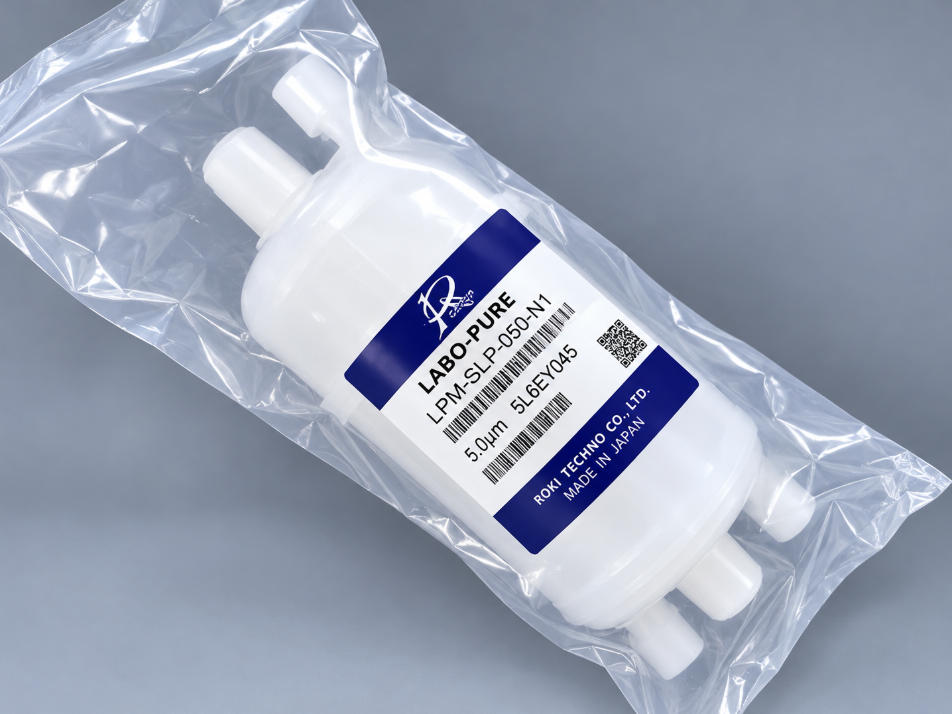
LPM-SLP-050-N1: 5 micron
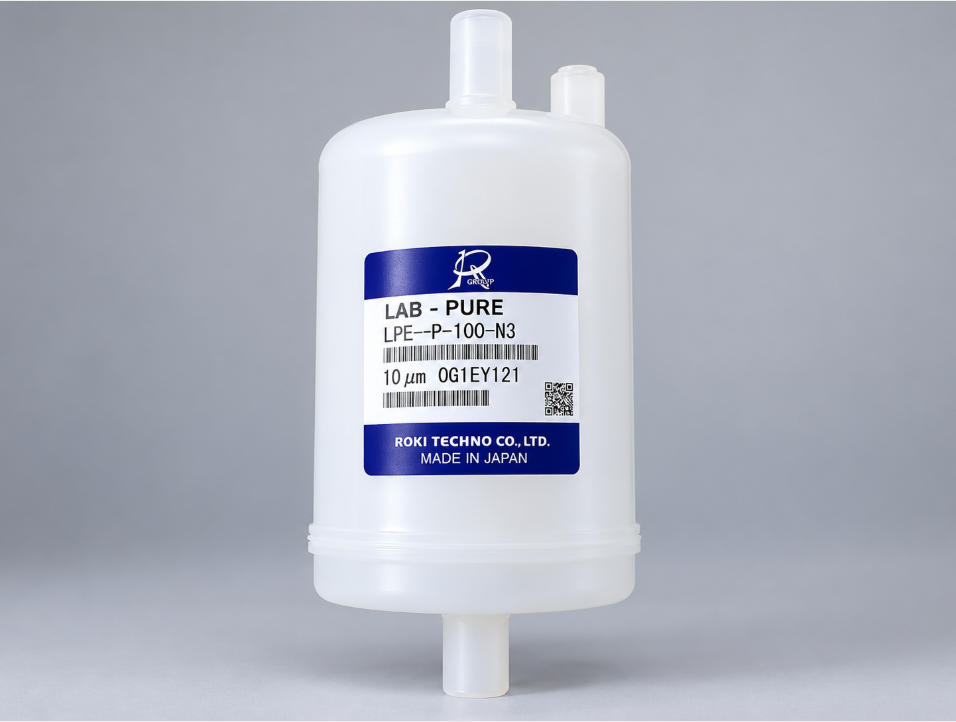
LPE-SLP-100-N3: 10 micron
These models differ in more than filtration rating.
Model Comparison
| Specification | LPM-SLP-050-N1 | LPE-SLP-100-N3 |
| Brand | ROKI TECHNO | ROKI TECHNO |
| Series | Labo-Pure | Labo-Pure |
| Filter type | Capsule filter | Capsule filter |
| Micron rating | 5 μm | 10 μm |
| Internal filter length | 100 mm | 125 mm |
| Inlet/outlet connection | NPT 1/4 inch | NPT 3/8 inch |
| Connection code | N1 | N3 |
| Potential application | Compatible Kerajet filtration systems | Compatible Kerajet filtration systems |
The dimensions and connection specifications are based on ROKI TECHNO’s Labo-Pure series documentation. Compatibility with a specific Kerajet machine must still be verified.
LPM-SLP-050-N1: 5 Micron Filter
The LPM-SLP-050-N1 is a capsule filter with a 5 μm filtration rating.
It features a 100 mm internal filter element and NPT 1/4-inch inlet and outlet connections.
When replacing this filter, buyers should check the existing model label and confirm the filtration system’s requirements.
LPE-SLP-100-N3: 10 Micron Filter
The LPE-SLP-100-N3 has a 10 μm filtration rating, a 125 mm internal filter element and NPT 3/8-inch inlet and outlet connections.
It is a different capsule configuration from the LPM model.
Even if both models are used in industrial ink filtration, they should not be treated as direct replacements without technical verification.
Can You Replace a 10 Micron Filter With a 5 Micron Filter?
Not necessarily.
A 5 micron filter may remove finer particles, but replacing a 10 micron filter with a 5 micron model can affect the ink filtration system.
Before making the change, consider three factors.
First, check the ink flow requirement.
The replacement filter must support the required flow rate without excessive pressure loss.
Second, check the filter dimensions and connections.
The LPM-SLP-050-N1 and LPE-SLP-100-N3 have different internal filter lengths and connection sizes.
Third, confirm the printer manufacturer’s specification.
Some filtration systems are designed around particular filter media and micron ratings.
Changing the filter specification without approval may cause operating problems.
The safest approach is to replace the original filter with the same confirmed model or an approved equivalent.
When Should You Replace a Kerajet Ink Filter?
Ink filters should be inspected and replaced according to the printer manufacturer’s maintenance recommendations.
Possible signs that a filter needs attention include:
Increasing pressure difference across the filter, where monitored
Reduced ink flow or unstable ink supply
Repeated filtration-related alarms
Visible contamination during maintenance
Reaching the recommended filter replacement interval
These symptoms do not always mean the filter is blocked.
For example, unstable ink delivery can also result from air entering the ink circuit, pump problems or restrictions elsewhere in the system.
Before replacing a filter, inspect the relevant components and follow the equipment’s maintenance procedure.
After installation, check connections for leaks and perform any required priming or air removal procedure before returning the printer to production.
How to Choose the Correct Kerajet Ink Filter
If you are purchasing a replacement filter, start with the original part number rather than choosing by micron rating alone.
Check the following information:
Existing filter model: Read the full part number printed on the filter label.
Micron rating: Confirm whether the existing filter is 5 μm, 10 μm or another rating.
Connection size: Check the inlet and outlet fittings.
Printer model: Identify the Kerajet equipment and filtration position.
Ink compatibility: Confirm that the replacement filter is suitable for the ink being used.
Required quantity: Confirm how many filters are needed for maintenance or spare inventory.
If the model label is unclear, take a photo of the existing filter and its connections.
This can help the supplier identify the correct replacement and avoid ordering mistakes.
Frequently Asked Questions
Is a 5 micron ink filter better than a 10 micron filter?
Not always. A 5 micron filter provides finer filtration under comparable conditions, but the correct rating depends on the ink formulation, required flow and printer specifications.
Can LPM-SLP-050-N1 replace LPE-SLP-100-N3?
They should not be considered directly interchangeable. They have different filtration ratings, internal filter lengths and connection sizes. Confirm compatibility before replacement.
Can a blocked ink filter cause printhead problems?
Yes. A restricted filter can affect ink supply and pressure stability, which may contribute to printing problems. However, printhead clogging can also have other causes.
How often should a Kerajet ink filter be replaced?
There is no single replacement interval suitable for every machine. Follow the equipment manufacturer’s maintenance schedule and consider operating conditions and filter pressure-drop limits.
Kerajet Ink Filter Replacement Support from Lemsun Tech
Choosing the correct ink filter is an important part of maintaining a reliable ceramic printing system.
Lemsun Tech supplies industrial printer spare parts, including ink filters and replacement components for ceramic printing equipment.
If you are looking for a ROKI TECHNO LPM-SLP-050-N1 or LPE-SLP-100-N3 filter, please provide your existing filter model, printer information and required quantity.
Our team can help check product identification, availability and quotation details.
Explore our Industrial Printer Ink Filters or contact Lemsun Tech for replacement filter inquiries.
Post time: Oct-10-2026