
When Should You Replace a Xaar 1003 GS6U Printhead?
A drop in print quality does not always mean that the printhead has failed. Ink contamination, blocked filters, unstable ink pressure, or incorrect waveform settings can cause similar symptoms.
Before replacing the printhead, check the basic inkjet system.
Replacement may be necessary when problems continue after proper maintenance, such as:
Persistent missing nozzles
Uneven or unstable inkjetting
Visible lines or banding
Poor color consistency
Frequent nozzle failures
Physical damage to the printhead
The key is to identify the cause before purchasing a replacement.
1. Confirm the Printhead Model and Printer
Start by checking the exact model of the existing printhead.
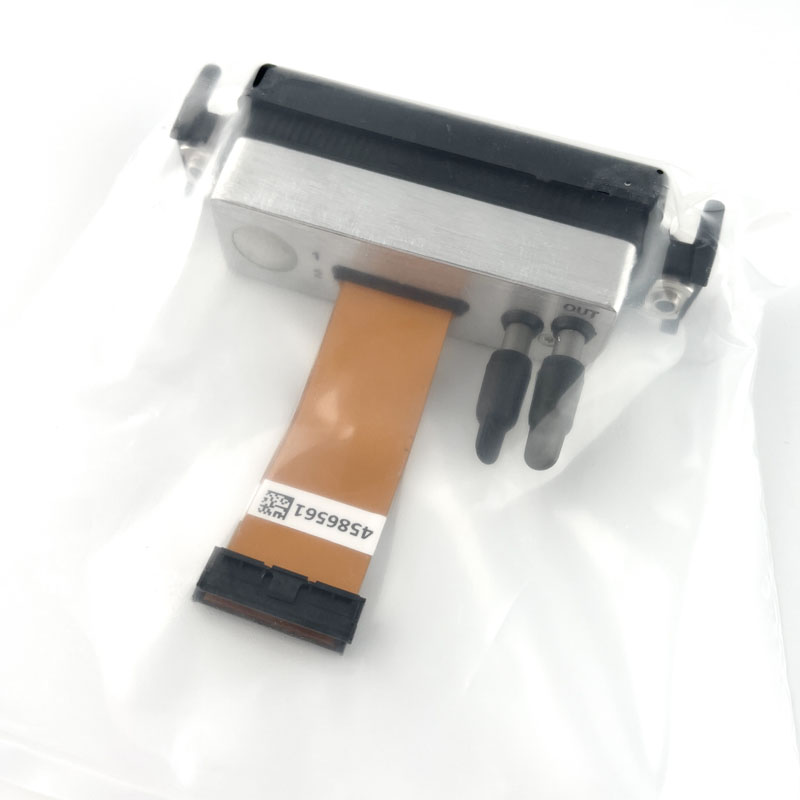
If your machine uses a Xaar 1003 GS6U, compare the model information on the printhead label with the replacement offered by the supplier. Do not rely only on appearance, as different industrial printheads can have different electrical and mechanical requirements.
When requesting a replacement, provide:
Existing printhead model
Printer model
Photo of the printhead label
Ink type
Required quantity
This information helps the supplier confirm the correct model more accurately.
2. Check Ink Compatibility
Ink compatibility is an important factor in industrial inkjet printing.
Before selecting a Xaar 1003 GS6U printhead, check the ink currently used in the machine. Useful information includes:
Ink type
Viscosity
Surface tension
Operating temperature
Pigment characteristics
Ink circulation requirements
This is particularly important for applications such as ceramic tile printing, where inks may contain pigments and require specific ink handling conditions.
If you are changing both the ink and printhead, consider the ink, printhead, and waveform as one system rather than making each decision separately.
3.Match the Printhead to Your Printing Requirements
Different industrial printing applications have different requirements.
A ceramic tile printer, for example, may require a different setup from a packaging or industrial coding system.
Before replacing a Xaar 1003 GS6U, consider:
| Requirement | What to Check |
| Application | Ceramic, decoration, packaging, etc. |
| Substrate | Tile, glass, metal, plastic, paper, etc. |
| Image quality | Detail, gradients, text, patterns |
| Printing speed | Required production output |
| Printing width | Single or multiple printhead arrangement |
| Ink | Ink type and characteristics |
| Colors | Number of colors or channels |
This helps avoid choosing a printhead based on a single specification while overlooking the requirements of the complete printing system.
4.Check Mechanical and Electrical Compatibility
A replacement printhead must also fit the existing printer physically and communicate correctly with its control system.
Before ordering, check:
Mounting position and dimensions
Printhead orientation
Ink inlet and outlet configuration
Cable and connector position
Nozzle-to-substrate distance
Driver electronics
Control board
Waveform
Operating parameters
The complete system can be viewed as:
Printhead → Driver Electronics → Waveform → Ink Supply → Software → Mechanical Mounting
Changing one component can affect the others.
For an existing machine already configured for Xaar 1003 GS6U, using the same model can reduce compatibility risks. If you are considering another Xaar printhead, its electrical, mechanical, ink, and control requirements should be confirmed before purchase.
Xaar 1003 GS6U or a Different Printhead?
In many cases, staying with the existing model is the simplest option.
Choose the same Xaar 1003 GS6U when:
The printer is already configured for this model
The existing printing performance meets your requirements
The current ink system works properly
You only need a replacement
You do not want to modify the printer
Consider another printhead when:
The printing application has changed
You need different printing performance
The existing model is no longer suitable
You are developing a new printing system
The printer electronics are being redesigned
If you change models, compare the complete system rather than specifications alone.
What Information Should You Send to a Printhead Supplier?
You do not need to prepare a long technical description when requesting a Xaar 1003 GS6U printhead.
The following information is usually enough to start:
Printer model:
Existing printhead: Xaar 1003 GS6U
Ink type:
Application:
Required quantity:
Photo of existing printhead label:
For example, if the printhead is installed in a ceramic tile printing machine, mentioning the application can help the supplier better understand the system requirements.
Providing complete information also makes it easier to confirm availability and replacement compatibility.
Maintenance Before Replacing the Printhead
Before installing a new printhead, check the basic operating conditions of the printer.
Poor printing can sometimes be caused by:
Ink contamination
Air entering the ink system
Incorrect ink temperature
Blocked filters
Unstable ink pressure
Incorrect waveform settings
Poor cleaning procedures
Contamination on the printhead surface
If these problems are not corrected, a replacement printhead may develop similar problems.
For this reason, diagnosis should come before replacement whenever possible.
FAQ: Xaar 1003 GS6U
What is Xaar 1003 GS6U used for?
The Xaar 1003 GS6U is an industrial inkjet printhead used in industrial printing systems. Its suitability depends on the printer configuration, ink, and specific application.
Can I replace a Xaar 1003 GS6U with another Xaar printhead?
Not necessarily. Different Xaar printheads can have different electrical, mechanical, ink, and control requirements. Compatibility should be confirmed before changing models.
How do I know if my Xaar 1003 GS6U needs replacement?
Persistent nozzle loss, unstable jetting, banding, or poor print quality after proper cleaning and system checks can indicate that the printhead needs replacement. However, these symptoms can also come from the ink supply or printer settings.
What should I provide when buying a Xaar 1003 GS6U?
The most useful information is the printer model, existing printhead model, ink type, application, required quantity, and a photo of the existing printhead label.
Selecting a Xaar 1003 GS6U printhead should start with the existing printer system, not the product name alone.
Check the printer, ink, electronics, waveform, mechanical installation, and printing requirements before making a decision.
If the current system is working properly and the printhead simply needs replacement, using the same Xaar 1003 GS6U configuration is often the most practical approach.
If the printer or application has changed, reassess the requirements before choosing a replacement.
Post time: Sep-15-2026